If you run a school, college, coaching institute, training centre, or online academy, you have probably experienced this problem:
- One tool for live classes.
- Another for sharing study materials.
- WhatsApp for announcements.
- Google Forms for tests.
- Spreadsheets for attendance.
- Another system for payments.
And somewhere in between, teachers are trying to keep track of everything.
It works when you have a small number of students.
But once your institution starts growing, this fragmented approach becomes difficult to manage.
This is where online class software can make a real difference.
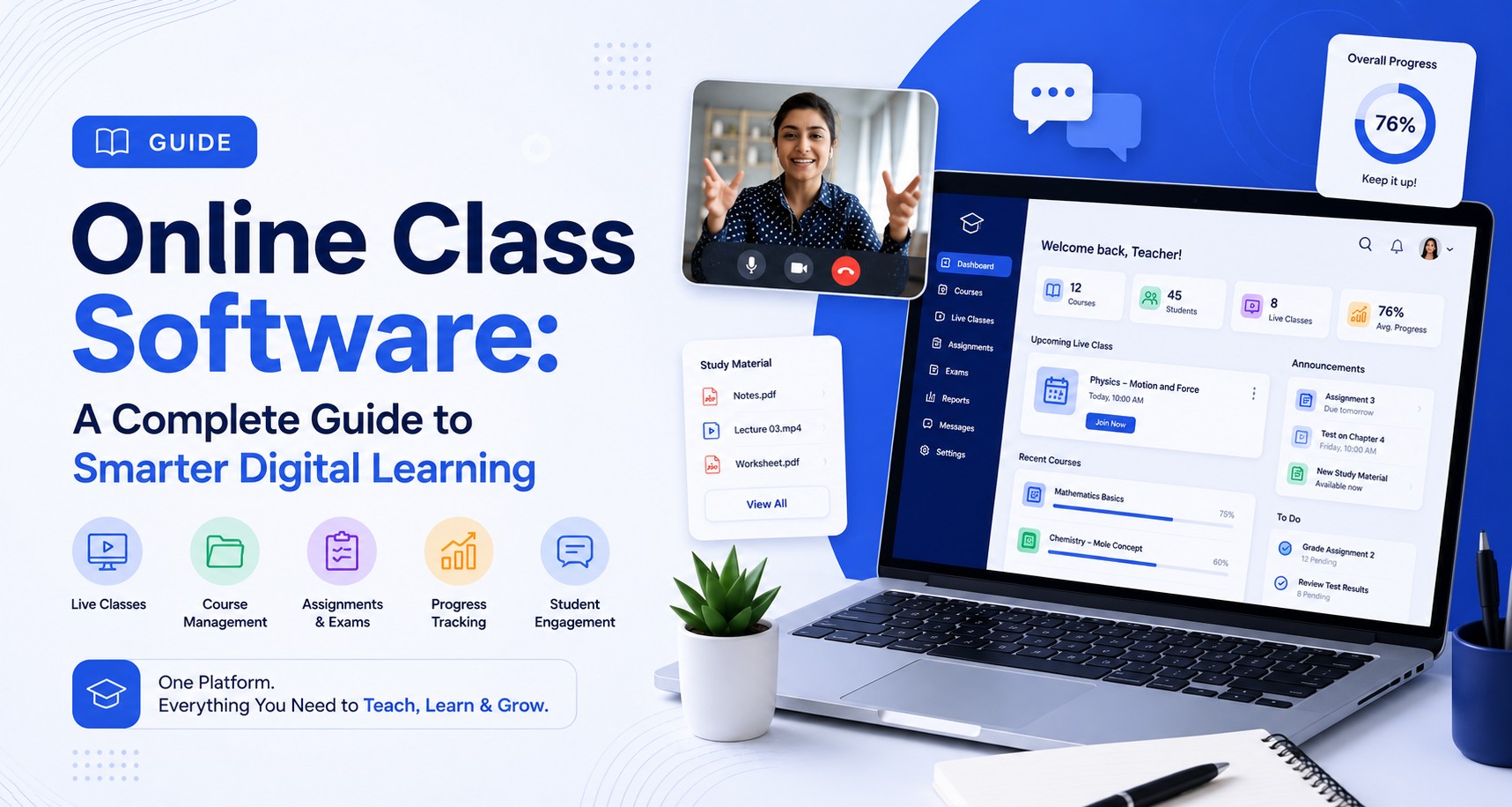
An online class platform is no longer simply a place where teachers conduct video classes. A good platform can bring live classes, recorded lessons, study materials, assignments, examinations, attendance, student communication and progress tracking into one connected learning environment.
After working with educational institutions and delivering 200+ LMS platforms across India and the GCC, we have seen an important pattern: institutions rarely struggle because they don't have enough software. They struggle because they have too many disconnected systems.
The right online class software should solve that problem — not create another one.
Table of Contents
- What Is Online Class Software?
- Why Are Institutions Moving Beyond Simple Video Classes?
- Online Class Software vs Video Conferencing Software
- What Should Good Online Class Software Include?
- Online Class Software for Coaching Institutes
- Online Class Software for Schools
- Online Class Software for Colleges and Training Institutes
- What We Have Learned From LMS Projects
- Ready-Made vs White-Label vs Custom Online Class Software
- How Much Does Online Class Software Cost?
- Common Mistakes When Choosing Online Class Software
- What Does a Smarter Online Learning Platform Look Like?
- Our Perspective: What Should You Choose?
- Final Thoughts
- Frequently Asked Questions
What Is Online Class Software?
Online class software is a digital platform designed to help educational institutions conduct, manage and track classes online.
Depending on the platform, it can include:
- Live online classes
- Recorded lectures
- Course management
- Digital study materials
- Assignments
- Online exams
- Quizzes
- Attendance
- Student progress tracking
- Teacher dashboards
- Notifications
- Communication
- Analytics and reports
- Mobile applications
But there is an important distinction.
Online class software is not just video conferencing software.
A video meeting tool helps you conduct a class. An online learning platform helps you manage the entire learning journey around that class.
That difference becomes increasingly important as the number of students, teachers and courses grows.
Why Are Institutions Moving Beyond Simple Video Classes?
When online education first became mainstream, many institutions solved the immediate problem with video conferencing.
The objective was simple: "How do we teach students remotely?"
Today, the question has changed. Institutions are asking: "How do we manage the complete digital learning experience?"
A student may attend a live class today, watch the recording tomorrow, download notes, complete an assignment, take a test and receive feedback — all as part of the same course.
That requires more than a meeting link. It requires a structured digital learning environment.
What we have observed
In the projects we have worked on, the need for an LMS often becomes obvious when an institution reaches a point where manual processes start consuming the teachers' and administrators' time.
For example: a coaching institute may start with 100 students and manage everything through WhatsApp and spreadsheets. Then it grows to 500 students. Then 2,000. Suddenly, questions start appearing:
- Who attended yesterday's class?
- Who watched the recording?
- Which students haven't completed the test?
- Which batch is performing better?
- Where can students find last month's study materials?
- Which students are falling behind?
- How can teachers communicate with an entire batch?
- How do we manage everything when we add another branch?
This is where a proper online class platform becomes more than a convenience. It becomes infrastructure.
Online Class Software vs Video Conferencing Software
This is one of the most common questions institutions ask us.
"Why should we invest in online class software when we already use Zoom or Google Meet?"
The answer depends on what you are trying to achieve.
A video conferencing platform is primarily designed for real-time communication. An online class platform is designed to manage learning before, during and after the class.
| Requirement | Video Conferencing | Online Class Platform |
|---|---|---|
| Live classes | ✓ | ✓ |
| Recorded classes | Limited | ✓ |
| Course management | ✕ | ✓ |
| Study materials | Limited | ✓ |
| Assignments | Limited | ✓ |
| Online exams | Limited | ✓ |
| Attendance | Basic | ✓ |
| Student progress | Limited | ✓ |
| Learning analytics | Limited | ✓ |
| Course structure | ✕ | ✓ |
| Student dashboard | ✕ | ✓ |
| Teacher dashboard | Limited | ✓ |
| Mobile learning | Depends on platform | ✓ |
This doesn't mean video conferencing tools are no longer useful. In fact, many institutions already have established workflows around them.
Our approach is usually practical: don't replace something that already works unless there is a reason to.
For some institutions, integrating their existing video-class infrastructure with an LMS is a better approach than forcing an immediate migration.
What Should Good Online Class Software Include?
One mistake we often see is institutions choosing software based on the number of features. More features do not automatically mean better software. What matters is whether those features solve your actual educational and operational problems.
Here are the capabilities we believe matter most.
1. Live Online Classes
Live classes remain at the centre of many online learning programs. A good platform should make it easy to:
- Schedule classes
- Invite students
- Conduct interactive sessions
- Track attendance
- Share screens or presentations
- Record sessions
- Provide access to recordings later
For coaching institutes in particular, the ability to connect live classes with batches and courses is extremely valuable. A class shouldn't exist as an isolated meeting link. It should become part of the student's course journey.
2. Recorded Classes
This is one of the most useful parts of digital learning. A student may miss a class because of an examination, travel, illness or another commitment. Even students who attend a live class may want to watch an explanation again before an examination.
Recorded classes solve this problem. But simply uploading videos is not enough. We recommend organizing recordings by:
This makes it much easier for students to find what they need.
3. Course and Study Material Management
Imagine a student asking:
"Where is the PDF from last week's class?"
If the answer is buried inside a WhatsApp group, the learning experience is already becoming inefficient. An LMS can organize:
- PDFs
- Videos
- Presentations
- Notes
- Documents
- Audio
- Reference materials
- Practice resources
Everything becomes part of the course rather than a collection of scattered files.
4. Online Exams and Assessments
For many institutions, particularly competitive-exam coaching centres, the examination system is just as important as the class system. A useful online examination module can include:
- Question banks
- Mock tests
- Timed exams
- Subject-wise tests
- Chapter tests
- Randomized questions
- Negative marking
- Automatic evaluation
- Instant results
- Performance analysis
Our insight
If an institute's business depends heavily on examination preparation, don't choose an LMS simply because its live-class interface looks good.
Test the examination engine first.
For PSC, NEET, KEAM, banking and similar coaching models, the quality of the test infrastructure can have a much greater impact on the student experience than a visually attractive dashboard.
5. Student Progress Tracking
This is where an online class platform becomes much more valuable than a collection of individual tools. Instead of simply knowing whether a student logged in, institutions can potentially understand:
- Classes attended
- Lessons completed
- Videos watched
- Assignments submitted
- Tests attempted
- Scores achieved
- Course progress
- Areas requiring attention
This gives teachers something more useful than raw activity data. It gives them context.
A student scoring poorly in a particular topic may need additional practice. A student repeatedly missing classes may need follow-up. A student progressing quickly may be ready for advanced material.
The purpose of analytics should not be to create more reports. It should help teachers make better decisions.
6. Attendance Management
Manual attendance becomes increasingly difficult as institutions grow. With online class software, attendance can be connected directly to scheduled classes and student profiles. This can be particularly useful for:
- Schools
- Colleges
- Coaching institutes
- Professional training centres
- Certification programs
It also creates a more reliable academic record than maintaining separate spreadsheets.
7. Student and Teacher Dashboards
A good dashboard should reduce confusion. Students should immediately be able to see:
Teachers may need:
Administrators may need an entirely different view:
This is why one dashboard cannot always serve everyone. Different users need different experiences.
8. Mobile Learning
This is one feature we would strongly recommend institutions evaluate carefully. For many students, the smartphone is their primary learning device.
A student may not always sit at a laptop to study. They may watch a recorded class while travelling, revise notes between classes or take a short practice test from their phone.
A mobile-friendly online learning platform therefore isn't simply an extra feature. For many institutions, it is a core requirement.
If you're evaluating an LMS, don't just ask: "Does it have a mobile app?"
Ask: "What can students actually do through the mobile app?"
Can they attend live classes? Watch recordings? Download resources? Take exams? Receive notifications? Track progress? The answer matters much more than the presence of an app-store listing.
9. Notifications and Communication
Students shouldn't have to search through multiple WhatsApp groups to discover whether their next class has been rescheduled. A centralized platform can provide notifications for:
- Upcoming classes
- New recordings
- Assignments
- Exam schedules
- Results
- Announcements
- Course updates
This makes communication part of the learning platform rather than another disconnected activity.
10. Analytics and Reports
For an institution owner, a dashboard should answer practical questions:
- Which batch is performing well?
- Where are students dropping off?
- Which courses have the highest completion?
- Which students need attention?
- Which teachers are handling the largest number of learners?
- Are students actually using the content we are producing?
These are business and academic questions — not merely technical questions. Good analytics should help answer them.
Online Class Software for Coaching Institutes
Coaching institutes are one of the strongest use cases for online class platforms. A typical coaching institute may need to manage:
- Multiple batches
- Multiple teachers
- Live classes
- Recorded classes
- Study materials
- Mock examinations
- Question banks
- Results
- Rankings
- Student communication
- Payments
- Performance tracking
As the institute grows, managing all of this manually becomes increasingly difficult.
A practical example
Imagine a coaching centre with:
Managing this through separate tools creates unnecessary operational complexity. A centralized LMS can connect the whole process:
That connected workflow is one of the biggest advantages of a properly implemented LMS.
Online Class Software for Schools
Schools have different requirements from coaching institutes. A school may need:
- Classes
- Subjects
- Teachers
- Students
- Assignments
- Exams
- Attendance
- Parent communication
- Fees
- Academic records
For these institutions, an LMS may work best when it is connected with broader school management or ERP functionality.
Our recommendation
Don't automatically purchase two separate systems simply because one is called an LMS and the other is called an ERP.
First map your actual workflow. If admissions, attendance, fees, academics, parent communication and digital learning need to work together, a connected system can often create a much better experience.
Online Class Software for Colleges and Training Institutes
Colleges and professional training institutes often need more structured course management. They may require:
- Multiple departments
- Faculty management
- Course structures
- Assessments
- Certifications
- Student records
- Reports
- Role-based access
For professional training, the platform may also need project submissions and skill-based assessments.
The important point is that the same LMS model doesn't necessarily work for every institution.
Your teaching model should determine your software architecture — not the other way around.
What We Have Learned From LMS Projects
After working with educational institutions over the years, we have noticed several patterns.
Lesson 1: Start With the Problem, Not the Feature List
Institutions often begin with: "We need an LMS with 50 features."
We prefer to start with: "What problem are you trying to solve?"
Maybe the goal is to:
- Reach students beyond a physical branch
- Reduce administrative work
- Improve examination management
- Launch an online course business
- Give students a better mobile learning experience
The answer changes what the LMS should look like.
Lesson 2: A Generic LMS Isn't Always the Best LMS
Ready-made LMS platforms can be excellent for certain institutions. If your requirements are standard and you want to launch quickly, a SaaS or white-label platform may be perfectly suitable.
But as an institution grows, it may need workflows that generic platforms don't support. For example:
- Custom examination patterns
- Unique student journeys
- Multiple branches
- Specialized dashboards
- AI-powered features
- Custom payment workflows
- Existing ERP integration
- Custom mobile experiences
This is where custom LMS development starts making more sense.
Our take
We don't believe every institution needs a custom LMS.
Build custom when your requirements justify it.
That is usually a better decision than building custom software simply because it sounds more advanced.
Ready-Made vs White-Label vs Custom Online Class Software
| Factor | Ready-Made SaaS | White-Label | Custom LMS |
|---|---|---|---|
| Initial cost | Lower | Moderate | Higher |
| Launch speed | Very fast | Fast | Depends on scope |
| Customization | Limited | Moderate | High |
| Branding | Limited | Stronger | Complete |
| Ownership | No | Usually limited | Full |
| Scalability | Depends on provider | Depends on provider | Designed for requirements |
| Unique workflows | Limited | Limited/Moderate | Excellent |
| Best for | Small/new institutions | Quick branded launch | Growing/complex institutions |
There is no universal winner. A small academy testing online education may not need a custom platform. A large institution with thousands of students and a complex learning model may eventually outgrow a rented platform.
The right choice depends on your goals, scale and long-term plans.
How Much Does Online Class Software Cost?
This is another question we hear frequently. The honest answer is: it depends.
Pricing can vary based on:
- Number of students
- Number of teachers
- Live-class requirements
- Video hosting
- Online examinations
- Mobile applications
- Custom branding
- Integrations
- AI features
- Security requirements
- Hosting
- Support
- Custom development
A basic online class platform and a complete LMS ecosystem are two very different products.
Don't compare only the monthly price
Suppose Platform A costs less initially but charges more as your student count increases. Platform B costs more initially but gives you greater control and predictable long-term costs.
Which one is cheaper? You can't answer that without looking at 2–3 years of actual usage.
That's why we recommend comparing total cost of ownership, not just the price shown on the first sales page.
Common Mistakes When Choosing Online Class Software
Choosing the Cheapest Platform
Price matters, but it should not be the only deciding factor.
Buying Too Many Features
You may end up paying for features your teachers and students never use.
Ignoring the Mobile Experience
If students primarily learn on mobile devices, this can become a serious limitation.
Not Testing the Exam System
For coaching institutes, this can be one of the biggest mistakes.
Ignoring Data Ownership
Before signing a long-term agreement, understand who owns your student data, content and other important information.
Skipping the Pilot
Don't launch a new platform to thousands of students without testing it first. Start with one course or one batch. Let teachers use it. Let students use it. Collect feedback. Then expand.
Thinking Technology Alone Improves Learning
An LMS is infrastructure. It doesn't automatically create good teaching. The content, teachers, instructional design and student support still matter.
What Does a Smarter Online Learning Platform Look Like?
We believe the future of online education isn't simply about putting traditional classes onto a screen. The better model is:
AI is now adding another layer to this ecosystem. Modern platforms can potentially use AI for:
- Personalized recommendations
- Automated evaluation
- Question generation
- Student assistance
- Performance insights
- AI-powered doubt solving
- Adaptive practice
But again, AI should solve a real problem. Adding an AI chatbot to an LMS doesn't automatically make the platform intelligent. The better question is:
Where can AI genuinely improve the student's learning experience or reduce the teacher's repetitive workload?
That's the question we encourage institutions to ask.
Our Perspective: What Should You Choose?
If you're a small institution starting your digital learning journey, a ready-made online class platform may be enough.
If you need your own branding and want to launch quickly, a white-label platform can be a practical middle ground.
If you're already operating at scale, have a unique learning model, or need complete control over your platform, a custom LMS may make more sense.
There is no single "best online class software" for everyone. The right platform is the one that fits:
That's the approach we take when evaluating LMS requirements for institutions.
Final Thoughts
Online class software has evolved significantly. It is no longer just about conducting a video lesson.
A modern platform can connect the complete learning experience — from the first class to the final assessment and everything in between. For educational institutions, the real value comes from bringing disconnected processes together.
All within one connected learning environment.
But before choosing a platform, don't start by asking: "Which LMS has the most features?"
Start with: "What do our students, teachers and institution actually need?"
That simple change in thinking can save significant time, money and frustration later.
And if you're planning to build or upgrade an online learning platform, our advice is simple:
Start with the learning experience. Build the technology around it.
If you're evaluating a platform for your own institution, we're happy to walk through what a good fit looks like for your students, teachers and workflow.
Frequently Asked Questions
What is online class software?
Online class software is a digital platform that helps institutions conduct and manage online learning. Depending on the platform, it can include live classes, recorded lessons, study materials, assignments, exams, attendance, communication and student progress tracking.
What is the difference between online class software and an LMS?
Online class software may focus primarily on conducting and managing online classes, while an LMS generally provides a broader environment for course management, content delivery, assessment, student tracking and reporting. Modern platforms often combine both.
Is online class software useful for coaching institutes?
Yes. Coaching institutes can use online class software to manage batches, live classes, recorded lectures, study materials, online exams, results, attendance and student performance from one platform.
Can online class software support live and recorded classes?
Yes. Most modern online learning platforms can support both live classes and recorded content, allowing students to attend sessions in real time and revisit lessons later.
Can an online class platform conduct exams?
Many platforms include online examination systems with question banks, timed tests, quizzes, automatic evaluation, results and performance reports.
Do I need an LMS if I already use Zoom or Google Meet?
Not necessarily for every institution. Video conferencing can be sufficient for simple live teaching. However, if you need course management, recorded content, assessments, attendance, student progress and centralized learning management, an LMS can provide a much more complete solution.
How much does online class software cost?
The cost depends on student capacity, features, mobile apps, video hosting, integrations, customization, AI capabilities, support and other requirements. Comparing total cost of ownership is usually more useful than comparing only monthly subscription prices.
Should I choose a ready-made or custom LMS?
A ready-made platform can be a good choice for standard requirements and quick deployment. A custom LMS is more suitable when an institution needs unique workflows, extensive customization, integrations, complete ownership or a platform designed around its long-term requirements.
What should I check before buying online class software?
Evaluate the platform's usability, live classes, recorded content, mobile experience, examination system, analytics, security, scalability, integrations, data ownership, support and total cost. Most importantly, test it with real teachers and students before making a long-term commitment.